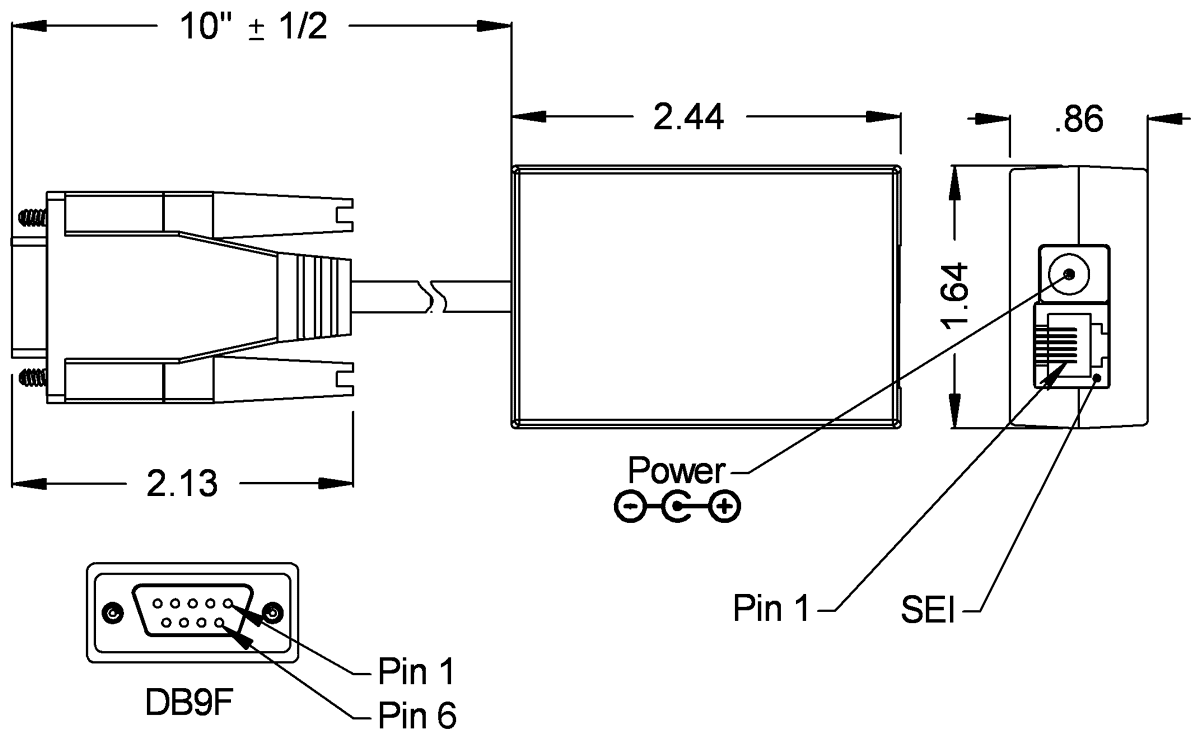
AD2B Product Description
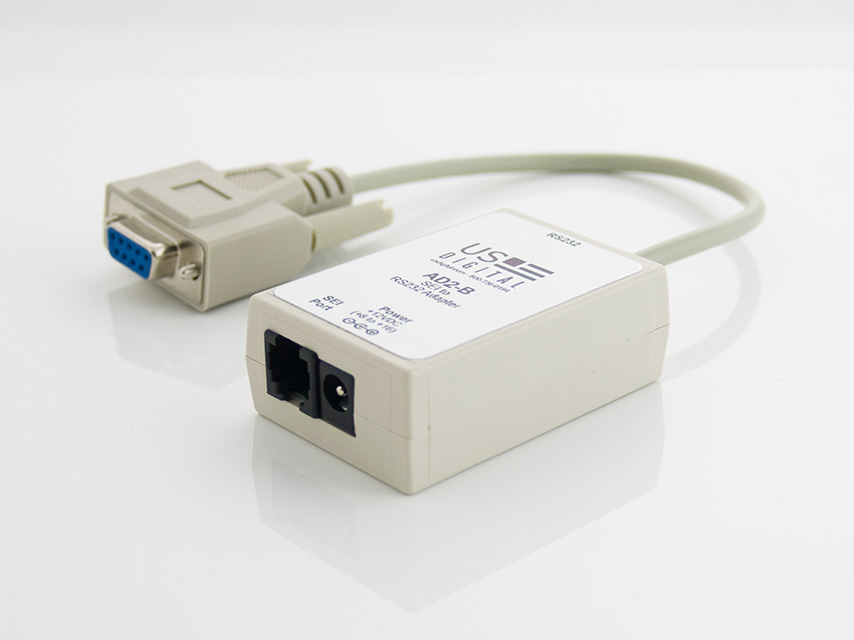
The AD2B adapter allows the RS-485-like signal of SEI devices to interface to a standard RS-232 port (9-pin DB), such as those in IBM-compatible PCs. The SEI (Serial Encoder Interface) bus is a simple, quick, and convenient network of SEI devices interfacing to an RS-232 serial port. The SEI bus supports from 1 to 15 devices on a single 6-wire telephone-type cable, up to 1000 feet long. For more information on the SEI bus, please see the SEI page.
The AD2B has 2 differential signals to interface to SEI devices: the bidirectional data pair for communication and the busy input pair for data flow control. The PS-12 power supply connects to the AD2B and furnishes power for all SEI devices on the bus.
Product Specifications
ELECTRICAL
Specifications apply over entire operating temperature range.
PARAMETER
MIN.
TYP.
MAX.
UNITS
NOTES
Supply Voltage
8.0
-
16
Volts
-
Supply Current (without encoders)
-
-
15
mA
-
Differential SEI Output voltage
2.0
2.75
5.0
Volts
Load = 100Ω
Differential SEI Input Voltage
0.2
-
5.0
Volts
-
Common Mode SEI Output Voltage
2.0
2.5
3.0
Volts
Load = 100Ω
Common Mode SEI Input Voltage
-4.5
-
3.0
Volts
-
Input current
-15
-
15
mA
In = 0 to 5V
RS-232 Output
±5.0
±8.0
-
Volts
-
RS-232 Input
±3.5
-
±15
Volts
-
RS-232 Input Resistance
3
5
7
kΩ
-
ABSOLUTE MAXIMUM RATINGS
PARAMETER
MIN.
MAX.
UNITS
Storage Temperature
-40
100
C
Operating Temperature
0
70
C
Humidity (non-condensing)
0
95
%
FUNCTIONAL PIN DESCRIPTIONS
MOD6:
PIN
NAME
DESCRIPTION
1
GND
Ground, common for power, data and busy pairs.
2
Busy+
Differential input line, active high, has 330 Ω pull down.
3
Busy-
Differential input line, active low, has 330 Ω pull up.
4
PWR
Power supply output to encoder bus.
5
DataL
Bidirectional differential data line, has 330 Ω pull up.
6
DataH
Bidirectional differential data line, has 330 Ω pull down.
DB9F:
PIN
NAME
DESCRIPTION
3
RXD
Data input from host, normally low.
2
TXD
Data output to host, normally low.
7
RTS
Not connected.
8
CTS
Busy line to host, active low.
5
GND
Ground, common for RS232 signals.
CABLES & CONNECTORS
6-pin Modular
Cables
Description
CA-MD6-SH-MD6-x
Modular connectors on both ends of a shielded cable
CA-MD6-SS-MD6-x
Modular connectors on both ends of a silver satin cable
Connectors
Description
CON-MD6-2J Two-way 6 conductor modular connectors
CON-MD6-3J Three-way 6 conductor modular connectors
Attention:
The cables supplied for the SEI bus by US Digital are wired straight through with no crossed wires. Cables and splitters intended for telephone system usage are wired differently and may damage your SEI device. Specify cable length when ordering.
PRODUCT CHANGE NOTIFICATIONS
Title
Date
Description
Download
PCN 1011
9/21/2011
The AD2B, AD4B, AD7, EADAPT, EDAC2, EDIVIDE, EPOT, EQUAD, ESUM, ESWITCH, ETACH2, SEI-USB, USB-232 currently utilizes a printed thermal transfer label. This label will no longer be used and will be replaced by laser marking directly onto the housing of the product. The purpose for this change is to create a more durable solution and eliminate the possibility of the label being inadvertently removed from the housing.
Download
PCN 4242
3/4/2014
This PCN is a formal notification that US Digital is discontinuing the AD2B SEI to RS-232 Adapter.
Additional Information
Software
Datasheet
Feedback
US Digital's mission is a commitment to quality and constant improvement. If you find an error to a product on this page, please let us know !
Save Your Configuration
Easily keep track of your custom part numbers
What is this feature?
While configuring your encoder, you can save your custom part number at any stage. This helps you keep track of multiple configurations without needing to start over or write anything down.
How does it work?
Click “Add This Configuration to Your List” after selecting your options.
Your saved part number will appear in a mini list below the configurator.
The list is stored locally in your browser and persists across product pages.
Enter a quantity to view default pricing.
What can you do with saved configurations?
When you're ready, visit the Saved Configurations List page to:
Review all saved part numbers
Fill out a form to send your selections to US Digital Customer Service
Receive follow-up to complete your order or get support
Why use it?
Save time by avoiding repeated configurations
Compare multiple part numbers side-by-side
Simplify communication with our support team
Got it!
 My Saved List